
An evil twin attack happens when a criminal sets up a fake Wi‑Fi access point using the same name as a real one, tricking your device into connecting so they can intercept your traffic or steal your login credentials. The single most damaging habit that makes this attack work is letting your phone auto-join open networks. Turn off auto-join, use a VPN on any public connection, and never enter a password into a Wi‑Fi login page that looks even slightly off.
TL;DR:
- Turning off auto-join for public and untrusted networks significantly reduces the risk of device automatic reconnections to fake hotspots.
- Attackers boost fake AP signals to appear stronger and lure devices into connecting without suspicion, especially in crowded areas.
- Credential prompts on Wi‑Fi login pages are common signs of evil twin scams, as legitimate networks rarely ask for passwords directly on captive portals.
- Using VPNs and enabling multi-factor authentication on sensitive accounts can prevent data theft even if connected to a rogue access point.
- Server certificate validation on enterprise networks like WPA3 and 802.1X remains critical for preventing impersonation of authentication servers during targeted attacks.
Table of Contents
- What Is a Wi‑Fi Evil Twin, and Why Does It Work?
- Public Hotspot Scams vs. Corporate WPA-Enterprise Attacks
- How to Spot a Fake Hotspot Before You Connect
- Prevention Checklist: Locking Down Your Wi‑Fi Habits
- If You Think You Connected to an Evil Twin
- Technical Appendix: Protocol Defenses for Practitioners
- Ethical Testing: What Separates a Professional From a Problem
- The Gap Between Common Advice and What Actually Stops This Attack
- Authorized Testing Tools for Security Professionals
- Sources
- FAQ
What Is a Wi‑Fi Evil Twin, and Why Does It Work?
An evil twin) exploits a simple flaw: your phone and laptop trust network names, not the hardware broadcasting them. Nothing stops an attacker from naming a rogue access point "Airport_Free_WiFi" identical to the real one, and most devices will connect to whichever signal is strongest without asking permission.
The attack usually follows a predictable chain, laid out clearly in a breakdown of the evil twin process:
- Reconnaissance: the attacker scans nearby networks and notes the SSID of a legitimate hotspot.
- Eviction: a deauthentication (deauth) attack forces connected devices off the real network by sending forged disconnect frames.
- Impersonation: a fake AP goes up using the same name, often with a stronger signal to win the reconnection race.
- Interception: once you're connected, the attacker can run DNS spoofing, sslstrip, or a fake captive portal to harvest credentials.
WPA-Enterprise networks face a variant of this where the fake AP impersonates the authentication server itself, a technique tracked separately below. Either way, the root cause is the same: your device judges trust by name alone, and it reconnects automatically the moment a familiar SSID reappears.
Public Hotspot Scams vs. Corporate WPA-Enterprise Attacks
Not every evil twin looks the same, and the two dominant versions target very different victims.
- Public/captive-portal attacks: the most common version. An attacker clones a coffee shop or airport network, then serves a fake login page asking for an email, loyalty number, or even a full password. The connection may be encrypted end to end, but that encryption does nothing once you've typed your credentials directly into the attacker's page.
- WPA-Enterprise attacks: a more targeted variant aimed at organizations using 802.1X authentication. Here the fake AP impersonates the RADIUS server itself, and it only succeeds if client devices are not configured to validate the server certificate. This is precisely the technique MITRE ATT&CK catalogs as T1557.004, Adversary-in-the-Middle: Evil Twin.
Researchers at USENIX documented how spoofing and injection attacks scale, showing that proximity and even automated bot amplification can extend an attacker's reach across DNS, TCP, and DHCP layers rather than just the Wi‑Fi handshake. That's a meaningfully bigger blast radius than a single fake login page in a café.
How to Spot a Fake Hotspot Before You Connect
A few seconds of skepticism catches most evil twins before they do damage.
- Check for duplicates. If your device shows two networks with the identical name, one is likely fake. Ask staff which is legitimate.
- Distrust an unusually strong signal. Attackers often boost their fake AP's power to win the auto-reconnect race, so a suspiciously perfect signal bar is a red flag, not a convenience.
- Question any credential prompt. Legitimate public Wi‑Fi almost never asks you to reenter your email password or banking login through a captive portal. The FTC warns that encryption protects data in transit but does nothing to stop you from typing your password directly into a scam page.
- Look for certificate warnings. A browser flagging an invalid or self-signed certificate on a network login page is a strong signal something's wrong.
Pro Tip: If you're technically inclined, comparing the BSSID (the AP's hardware MAC address) against what you saw last time you connected is one of the fastest ways to catch a spoof, but only run active scans on networks you own or have explicit written permission to test.
Prevention Checklist: Locking Down Your Wi‑Fi Habits
Most of the damage from an evil twin attack traces back to a handful of preventable habits. Fix these first.
- Turn off auto-join for any network not explicitly trusted, and forget public Wi‑Fi networks once you're done using them.
- Use your phone's mobile hotspot instead of public Wi‑Fi whenever the option exists. It removes the entire attack surface.
- Run a reputable VPN on any network you don't control. Kaspersky recommends this as a baseline defense, since it encrypts your traffic even if you've landed on a rogue AP.
- Enable multi-factor authentication on email, banking, and any account holding sensitive data, so a stolen password alone isn't enough.
- Keep your OS and browser updated. Security patches routinely close the exact certificate-validation gaps evil twins exploit.
- Decline any captive portal that asks for a full account password. A guest network requesting a room number or email is normal. One requesting your Gmail password is not.
Recent public Wi‑Fi guidance from SecureRank's 2026 airport and coworking-space checklist frames it the same way: the highest-leverage fix isn't a fancier tool, it's changing the default failure mode, meaning you stop auto-joining and stop trusting names.
For organizations, the fix moves up a layer. IT teams should require server-certificate validation on 802.1X client profiles, adopt WPA3 with 802.11w (Protected Management Frames) to blunt deauth attacks, and deploy a wireless intrusion detection or prevention system (WIDS/WIPS) that flags duplicate SSIDs automatically.
If You Think You Connected to an Evil Twin
Act fast. The window between connecting and real damage is usually short, but it's not zero.
- Disconnect immediately and switch to mobile data or a network you trust.
- Change your passwords from that trusted connection, starting with anything you typed while on the suspect network.
- Revoke active sessions on affected accounts and turn on MFA if you haven't already.
- Rotate any reused passwords. If you typed your email password into a fake portal and reuse it elsewhere, that account is exposed too.
- Notify the venue if the attack happened at a business location, and contact your bank if financial details were entered.
- Note the SSID, time, and a screenshot of what you saw, in case you need to report the incident, but don't run further diagnostics on a device you suspect is still compromised.
Technical Appendix: Protocol Defenses for Practitioners
For readers building or auditing defenses rather than just avoiding them, the mitigations sit at the protocol layer.
- WPA3 and 802.11w (PMF) protect management frames, which directly blunts the deauthentication step attackers rely on to evict clients from a legitimate AP.
- Server-certificate validation on 802.1X client profiles stops rogue RADIUS impersonation cold, even if an attacker successfully stands up a fake AP with the right SSID.
- TLS and HSTS, combined with a VPN, limit how far sslstrip-style downgrade attacks can go, since a properly configured HSTS policy prevents silent HTTP fallback.
- Attack tooling in this space generally falls into three categories: deauth/eviction tools, fake AP hosting frameworks, and captive-portal phishing kits. None of that should be run outside a lab you own or an engagement with explicit written authorization. Wi‑Fi spoofing without consent is illegal in most jurisdictions and carries real legal exposure regardless of intent.
Ethical Testing: What Separates a Professional From a Problem
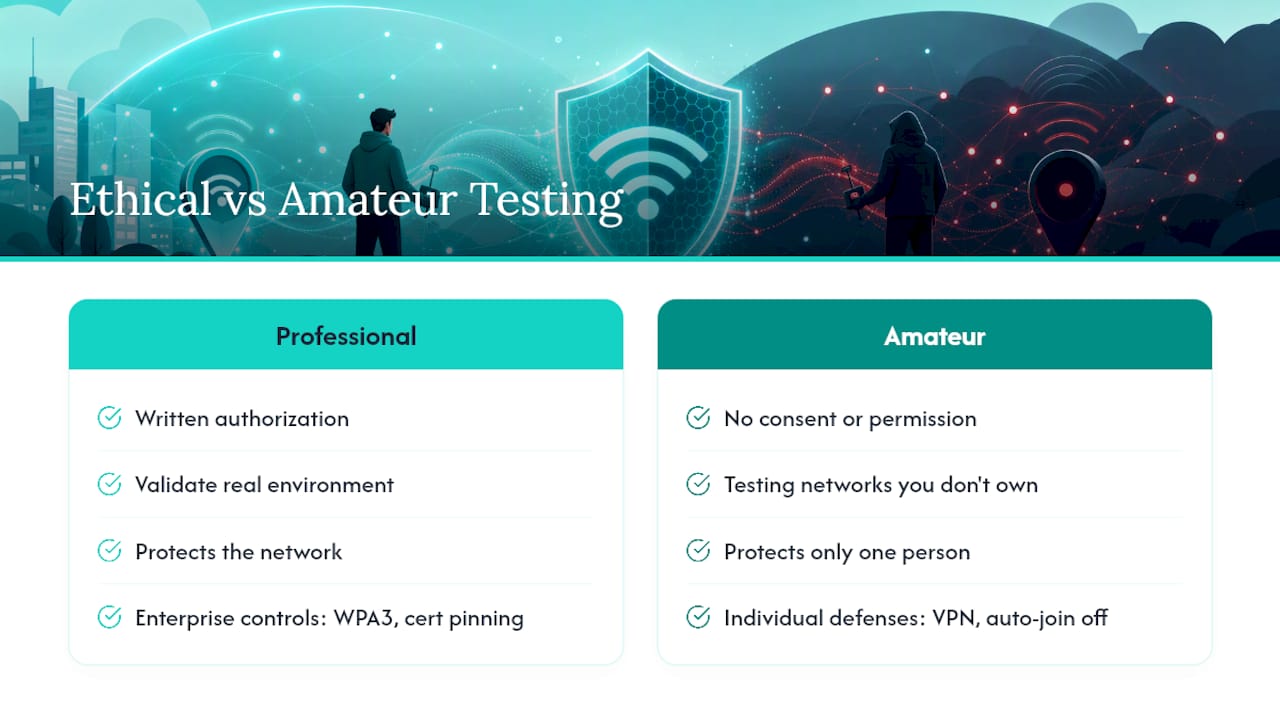
Consent is the entire difference between security research and a crime. Individual defenses (auto-join off, VPN on) protect one person; enterprise controls like WPA3 and certificate pinning protect a network. Amateur testing on networks you don't own, even "just to see," crosses a legal line fast. If you need to validate a real environment, get written authorization or bring in someone who does this professionally.
The Gap Between Common Advice and What Actually Stops This Attack
Most public Wi‑Fi advice tells you to "look for HTTPS" and call it a day. That guidance is outdated. HTTPS protects data in transit, but it does nothing once you've willingly typed a password into a fake captive portal that's also serving over HTTPS. The attack has moved up the stack, from packet sniffing to social engineering dressed up as a login screen.
The advice that actually holds up under scrutiny is boring: disable auto-join, forget networks after you use them, and let a VPN do the encrypting instead of trusting whatever network happens to look familiar. Standards like WPA3 and 802.11w matter enormously at the infrastructure level, but they protect the network operator, not the person connecting from a coffee shop with auto-join switched on. Individuals need to fix their own failure mode first. No standard fixes a habit.
If there's one thing worth pushing back on, it's the assumption that evil twins are rare or sophisticated. They're neither. The tooling is trivial to acquire, and the "attack" is often just a name and a stronger antenna. Treat every unfamiliar network login page with the same suspicion you'd give an unsolicited password reset email, because functionally, that's what it is.
— Prada
Authorized Testing Tools for Security Professionals
Spotting an evil twin from the defensive side is one skill. Building and testing one, legally, in a lab or an authorized engagement, is a different job entirely, and it's the job security consultants and researchers get paid to do. That work requires purpose-built hardware, not a laptop held together with scripts.

AetherKey is a compact, multi-protocol field toolkit built for exactly that work: a Wi‑Fi attack suite alongside HID payload tools, NFC/RFID, sub-GHz radio, and infrared, all run from a single handheld unit. It's designed for consultancies, trainers, and researchers who need to demonstrate an evil twin, a deauth attack, or a rogue AP scenario during an authorized assessment, without carrying five separate devices to do it. Every capability on the device is intended strictly for testing you're authorized to perform. If you run security assessments professionally, check out AetherKey's Regular and Pro editions and see which fits your engagement work.
Sources
- What is an Evil Twin Attack? Evil Twin Wi‑Fi Explained — Kaspersky
- Adversary-in-the-Middle: Evil Twin, Sub-technique T1557.004 - MITRE ATT&CK
- Large-scale Wi‑Fi spoofing — USENIX
- Evil Twin Attack Explained — Hacking Labo
FAQ
Can Someone See Everything on My Phone if I Use Their Wi‑Fi?
No, but they can see unencrypted traffic and any credentials you type into a fake login page. A VPN blocks most of this by encrypting your traffic before it ever touches the network.
Is It Easy to Spot an Evil Twin Attack?
It's easier than most people assume once you know the signs: duplicate network names, an unusually strong signal, or a captive portal asking for a full password are all warning signs a real hotspot rarely shows.
How Do I Avoid an Evil Twin Attack?
Turn off auto-join, forget public networks after use, run a VPN on any connection you don't control, and never enter an account password into a Wi‑Fi login page.
What Kind of Attack Is Most Associated With Evil Twins?
Evil twins are a form of man-in-the-middle attack, classified under MITRE ATT&CK's T1557.004, since the attacker positions themselves between you and the internet to intercept or manipulate your traffic.